Clarity Markup
Marked up before the meeting ends.
Clarity Markup is a web app for marking up drawings, photos and PDFs. Revision clouds, real dimensions and numbered comments stay editable, and the PDF you issue opens in Acrobat or Bluebeam as comments the design team can reply to.
What it does
Revision clouds that carry their note
Cloud the change and type what changed in one action, so the note travels with the cloud instead of sitting in a separate email.
Real dimensions
Calibrate once against a known length on the drawing and every dimension you draw afterwards reads out in millimetres or metres. Or switch measuring off and type your own figures.
Numbered comments with a schedule
Drop numbered pins, write the comment against each one, mark them open or closed, then export the whole list as a comment schedule to send back to the design team.
Zones, callouts and stamps
Shade areas in transparent red, green, blue or orange. Add leader callouts. Apply approval stamps carrying your name and the date.
Markup that stays editable
Save the job and every annotation can be moved, re-worded or deleted later — it is not burned into a flat image. Export a flattened PNG, JPEG or PDF when you are ready to issue it.
Three things it changes
Comments the design team can act on
The PDF you issue carries every mark as a genuine PDF comment. In Acrobat or Bluebeam they can reply to each one and tick it off, instead of reading a flattened picture.
Measure in real units
Calibrate once against a known length. Dimensions, routes, angles, areas and counts then read in millimetres or metres, and export to Excel with their totals.
Your drawings stay on your machine
Files are opened and saved on your own computer. Nothing is uploaded to us, which matters when a client restricts where their drawings may go.
What it looks like
Screens from Clarity Markup, the web app, on an example floor plan. Every one is the live product, not a mock-up.
A drawing, marked up
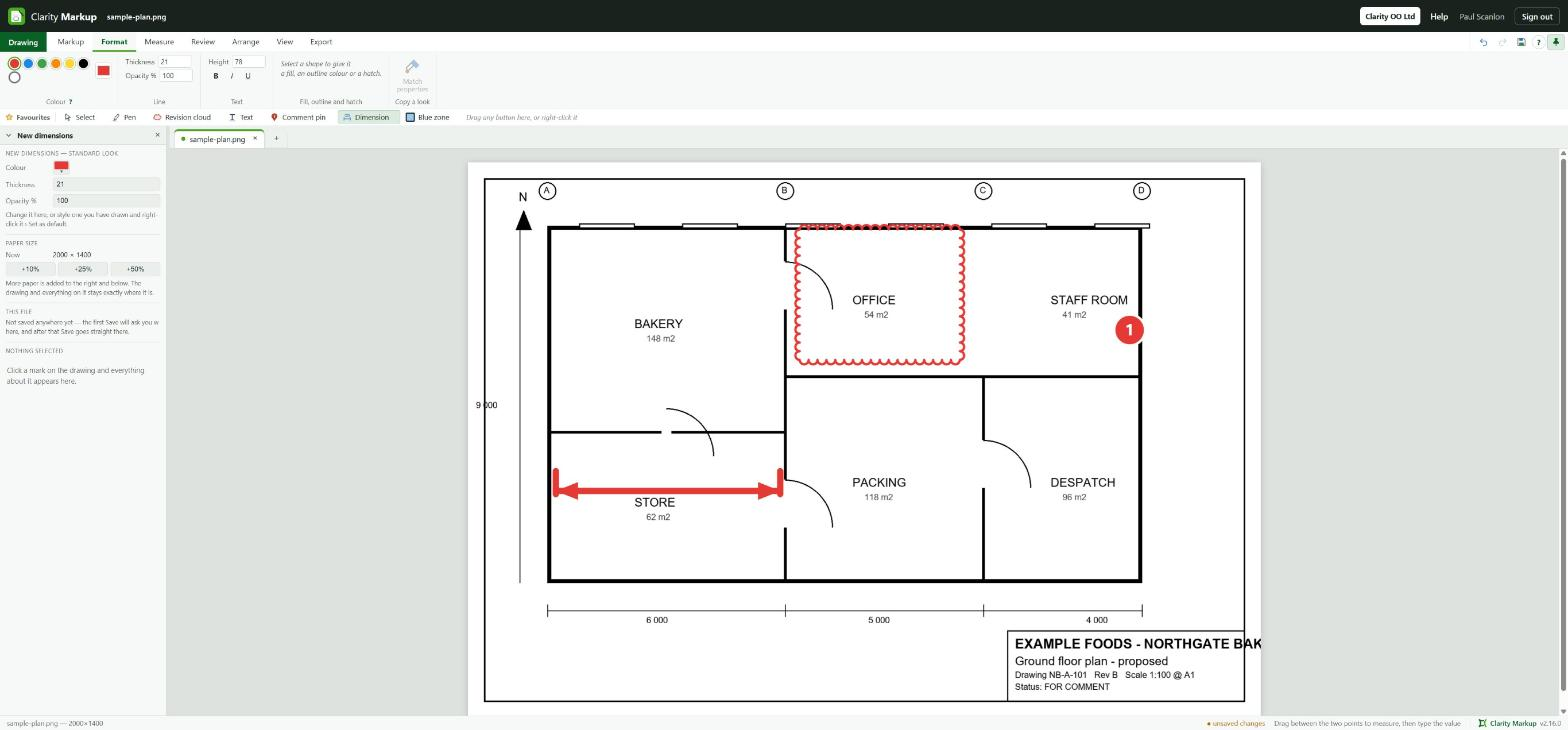
Open a drawing, a photo or a PDF and it fills the sheet. The quick bar under the ribbon holds the marks you use most: select, pen, revision cloud, text, comment pin, dimension and zone. Here the office has a revision cloud round it, a numbered comment pin sits in the staff room, and a dimension runs across the store. Every mark stays a separate object, so it can be moved, re-worded or deleted later.
The marks, close up
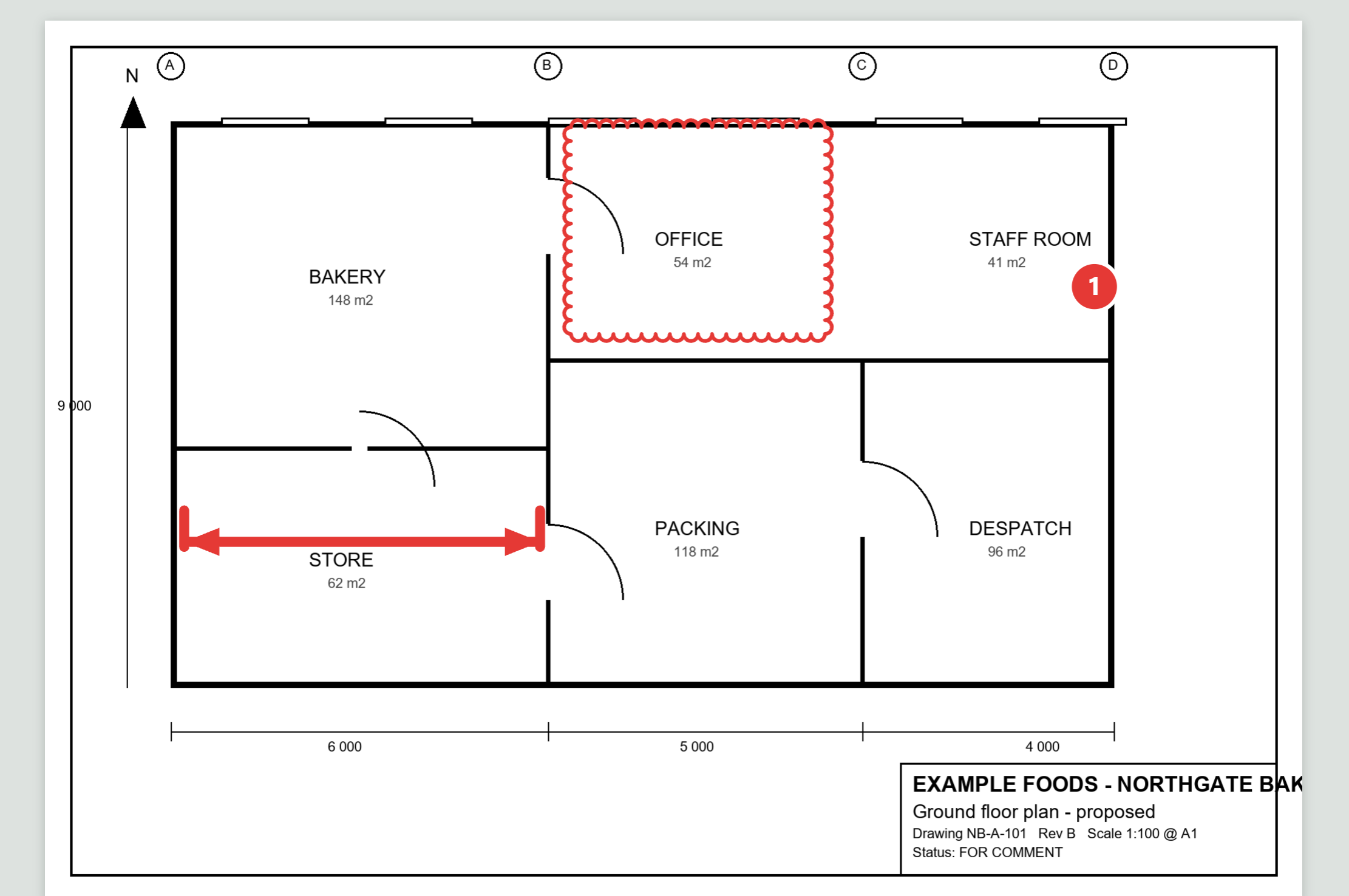
A revision cloud round what changed, a numbered comment pin that carries its note, and a dimension drawn between two points. Calibrate the drawing once against a known length and every dimension after that reads in real units.
Measure
Set the scale by calibrating against a known length, or let it be read from the drawing. Then dimensions, routes and angles, areas and irregular areas, and a count that numbers what you click.

Review
Numbered comment pins build a schedule you can copy out, a stamp approves a drawing, layers keep one reviewer’s marks apart from another’s, and Compare shows what changed between revisions.

Export
Issue an editable PDF whose markup stays editable in Acrobat and Bluebeam, save or copy a picture of any part of the drawing, and send the comment schedule or a count to Excel.

Who it is for
Architects and designers
Answer a set of comments on the drawing itself, carry the ones that still stand onto the next revision, and issue a clean PDF.
Engineers
Cloud the change and note it in one action, dimension against a calibrated scale, and send a comment schedule back to the design team.
Contractors and site teams
Mark up a site photo or a drawing on the spot, put several pictures on one sheet, and issue it as a PDF the same day.
Quantity surveyors and estimators
Count items by category and measure areas on the drawing, then export the counts and areas to Excel with their totals.
Built for the next revision
Most markup tools flatten your comments into the picture the moment you save. That is fine until the drawing comes back at revision C and half your comments still apply. Clarity Markup keeps every cloud, dimension and comment as a separate object, so you carry the ones that still stand onto the new drawing instead of redrawing them.
Layers let each reviewer or discipline mark up the same drawing without getting in each other's way, and hidden layers stay out of what you issue. Compare lays another revision over the one you have open, so you can see what moved.
It is a web app: install it from Chrome or Microsoft Edge and it opens in its own window, like any program. After the trial it is £12 a month per user, or £120 a year. Prices include VAT. See pricing.
Pricing
The total you pay. Pay monthly, or annually for the price of ten months.

Clarity Markup
Charged per user. Each person who marks up pays; nobody else does.
Prices include VAT. Clarity is sold for business use only. It is bought by companies and by people working for themselves, not by consumers.
- Clarity-OO LtdRegistered in England and Wales, company number 17484245
- Registered with the ICOZC267390
- 7-day free trialNo card needed to start
- Prices include VATThe price shown is the total you pay
- Your drawings stay on your machineFiles are read and written in place; nothing is uploaded to us
- Business use onlySold to companies and the self-employed, not consumers
Questions people ask about Clarity Markup
What is Clarity Markup?
A web app for marking up construction drawings, photos and PDFs: revision clouds, dimensions, numbered comment pins, zones, callouts and approval stamps. Every mark stays editable, and the PDF you issue carries them as genuine PDF comments.
How much does Clarity Markup cost?
After the trial it is £12 a month per user, or £120 a year. Prices include VAT.
Who is charged for?
Charged per user. Each person who marks up pays; nobody else does.
What files does it open?
Drawings and photos as JPG, PNG, GIF, BMP or WebP; PDFs, with every page keeping its own markup; and its own .clarity project files, which reopen with every mark still editable.
Are my drawings uploaded anywhere?
No. Files are opened from and saved to your own computer; nothing is uploaded to us. The app only checks your Clarity account when it opens.
Can the people I send it to read my comments?
Yes, without Clarity Markup. The PDF export writes each mark as a genuine PDF annotation, so Acrobat, Bluebeam and other PDF readers show a list of comments they can reply to and tick off.
Can several people mark up the same drawing?
Yes. Each reviewer or discipline works on its own layer, and you choose which layers to show. Hidden layers are left out of what you issue.
Which browser should I use?
Chrome or Microsoft Edge, on Windows or a Mac. There, Save writes straight back over the original file, and the app installs into its own window.
What happens to my drawings if I stop subscribing?
They are on your own computer, so they are never held back. Clarity Markup opens read-only: you can still open, print and export them, but not change the markup.