
Clarity Planner
Know what the programme is waiting for.
Clarity Planner is a web app for construction programmes: the Gantt chart, the information and approvals each task needs, and the reports that follow. It opens MS Project, Primavera P6 and Asta Powerproject files and sends the look-ahead and weekly report on a timetable you set. Viewers and contractor links are free.
What it does
Opens what you already have
.mpp, .pp and .xer files, and Asta bar-chart PDFs.
Look-aheads as standard
The next weeks lifted out of the programme, ready for the site meeting.
Information and approvals
What is needed, from whom, and by when, tied to the programme.
Issued revisions and reports
Issue the programme, and send the reports on a timetable you set.
Viewers and contractor links are free
Only the people who edit programmes are charged for.
Sent a programme you can't open? Open MS Project, Primavera P6 or Asta Powerproject files free in your browser, with no account, and nothing kept unless you choose to send us a file that won't open.
Three things it changes
Know what each task is waiting for
Design information, approvals and orders sit on a band above the chart, each with the date it is needed by. Each moves with its task, and anything late turns red.
The week's reports, on your timetable
Choose who gets the weekly report, look-ahead, site board and meeting pack, and when. Each contractor can get its own two-week sheet, and every copy sent is numbered and filed.
Seen by everyone, paid for by editors
Share a live, read-only link that needs no account, or give each contractor a link to just its own rows. Viewers and contractor links are free.
What it looks like
Screens from Clarity Planner, with example programmes. Every one is the live product, not a mock-up.
The programme
The task list sits beside the chart. Sections are the shaded rows and the tasks indented under them roll up into them; each task has its length, start, finish, percent done and what it follows. On the chart are the bars, the links between them, today's line and the progress line, so you can see at a glance which tasks are behind.
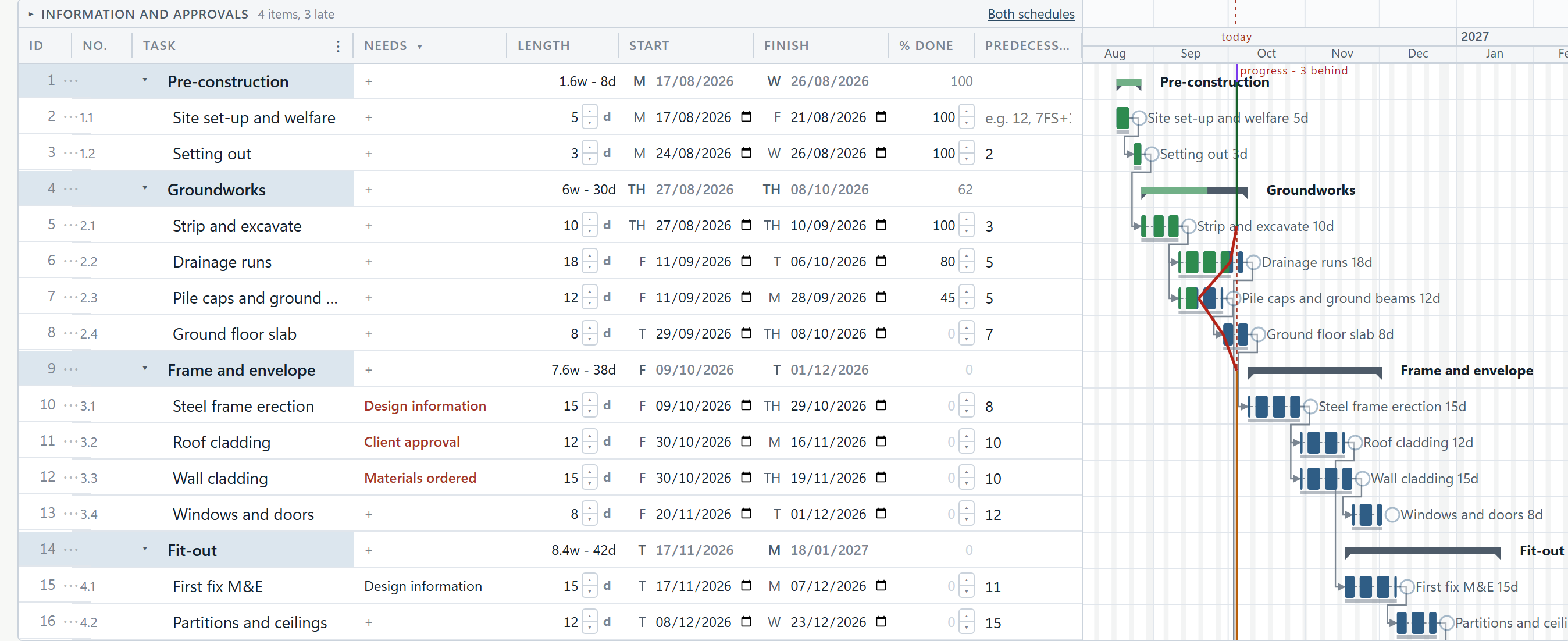
The information you need, and when
Design information, approvals and orders each sit on the needs band above the chart as a short bar ending in a diamond on the date it is needed by. A need that is late turns red, so the question “what are we waiting for?” is answered by looking up.

The Monday routine
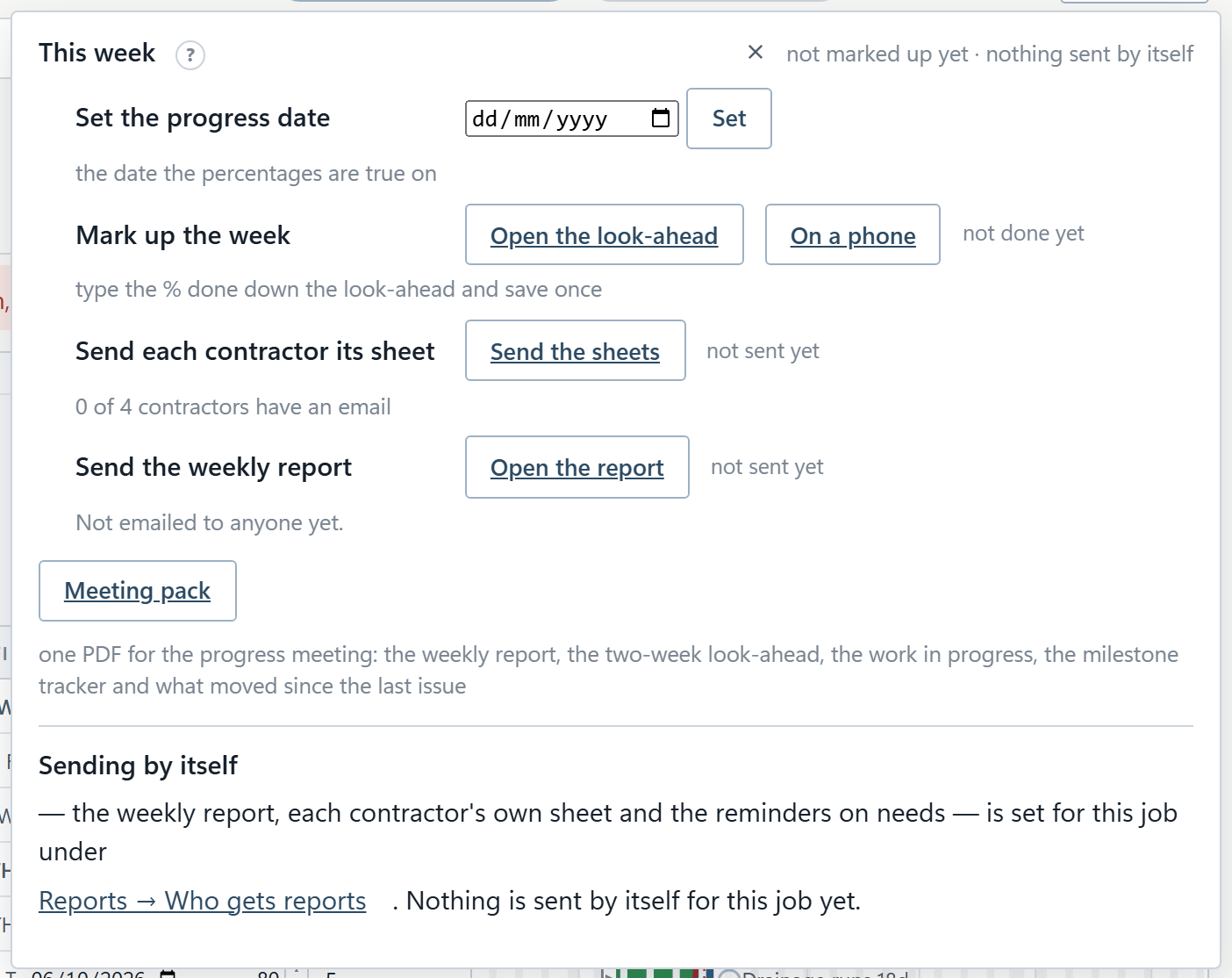
This week opens from the title line and runs the week in order: set the progress date, mark up what was done, send each contractor its own sheet, and send the weekly report. The reports can then go out on their own, at the times you set.
Reports
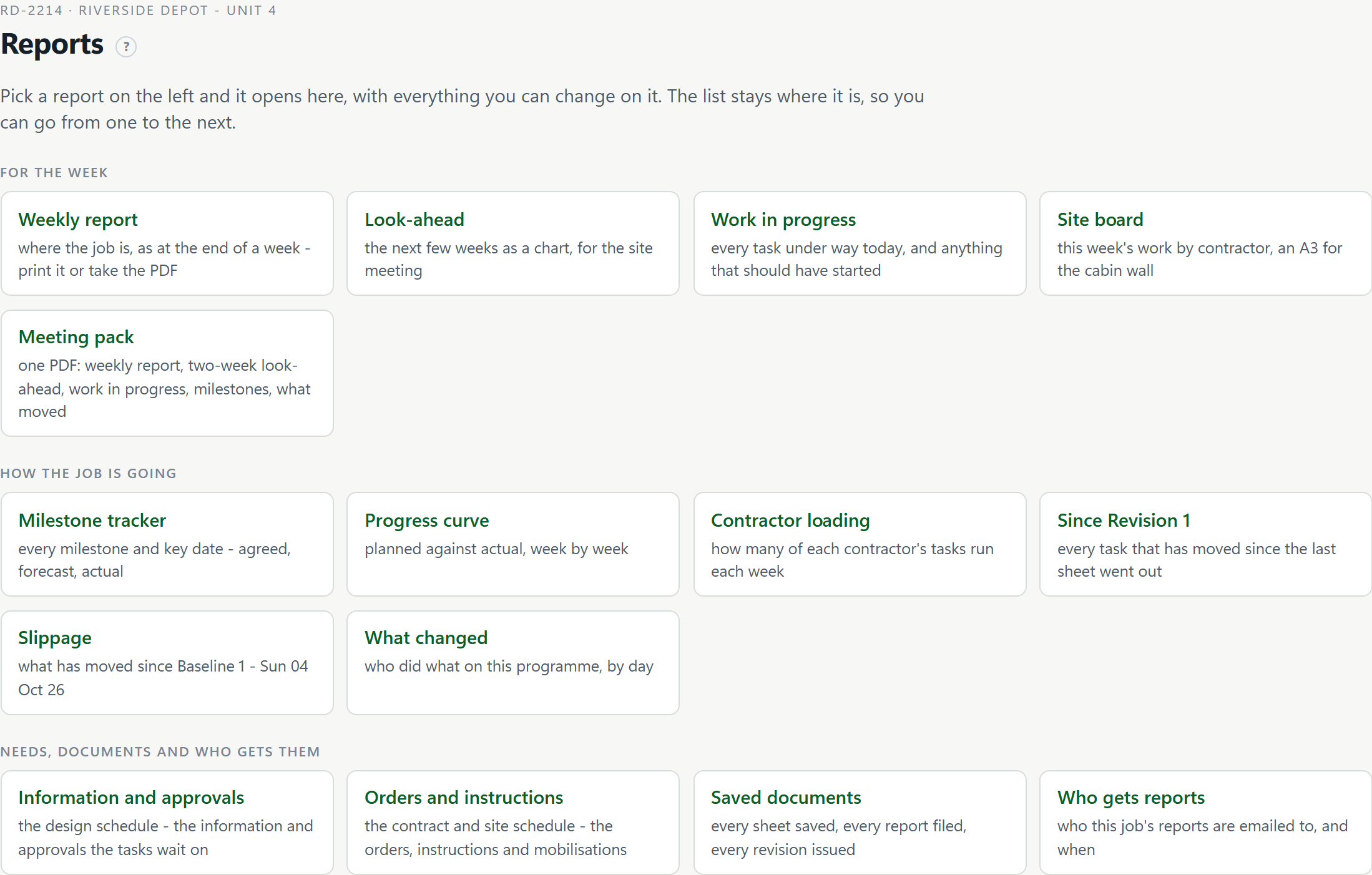
Every report on the programme is listed on the Reports screen, grouped into the week, how the job is going, and needs and documents. Pick one and it opens beside the list.
Issuing a revision
Issue and export keeps the revisions list: each revision’s reference, document number, date, seal and note, so the programme you issued last month can be opened exactly as it was.

Your programmes
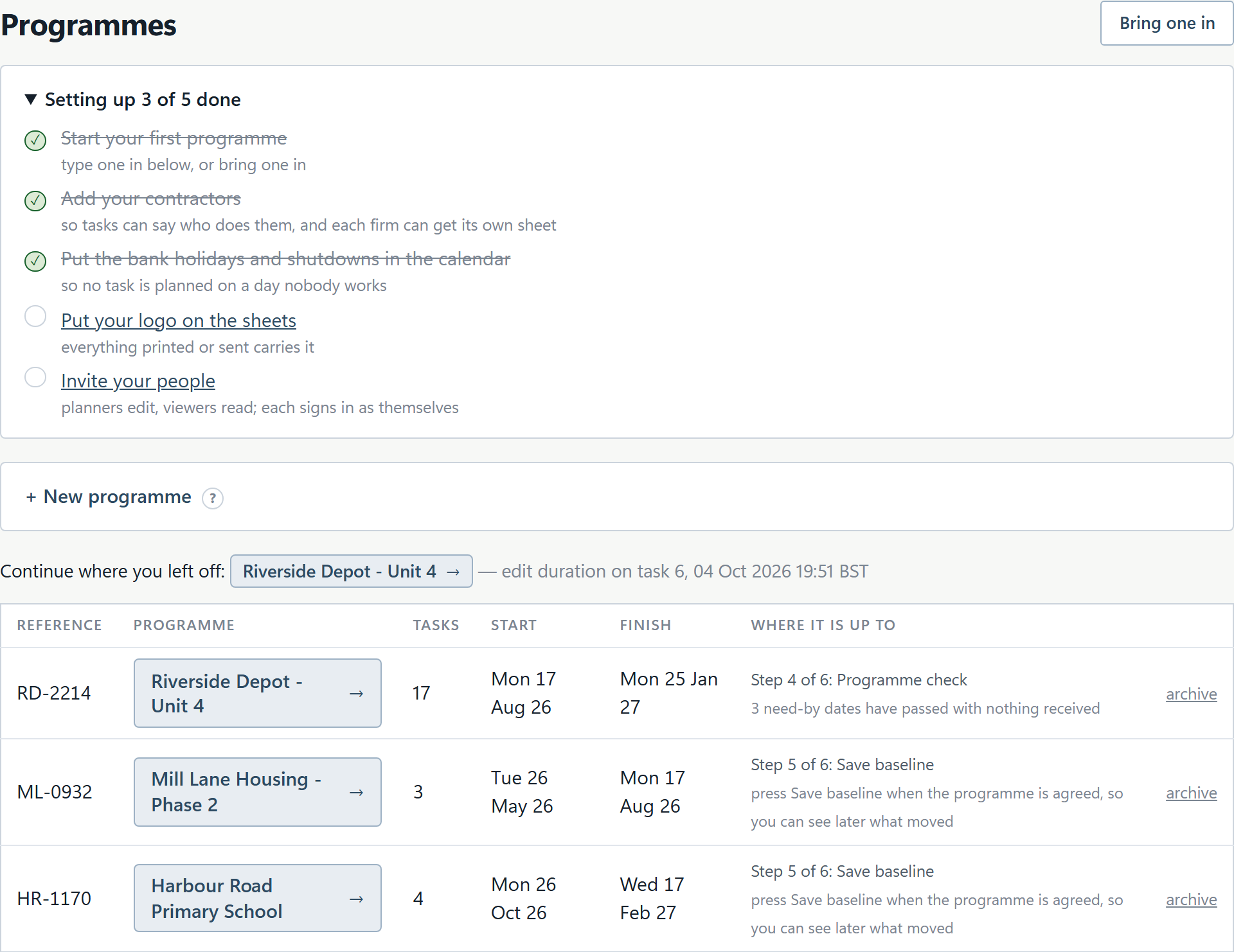
The Programmes page lists every programme and the step it is up to, worked out from what is in the programme rather than from a status somebody typed.
Who it is for
Planners
Bring in the .mpp, .xer or .pp you were sent, link it, let the programme check find what would mislead, then issue a numbered, sealed revision.
Project managers
See slippage against the baseline, the milestone tracker and what has moved since the last issue, with every live programme on one Overview page.
Site managers
Mark up the week's progress, on a phone if need be, print the four-week look-ahead for the site meeting, and put the A3 site board on the cabin wall.
Design managers
Keep the information and approvals schedule tied to the programme, send designers their release schedule, and remind whoever an item sits with.
Built for running the job, not just drawing it
A programme earns its keep after it is issued. This week, on the programme's title line, sets out the Monday routine in order: set the progress date, mark up what was done, send each contractor its own sheet and send the weekly report. Each step says when it was last done and by whom.
The programme checks itself every time it is drawn and says, in one sentence, the thing that would mislead somebody: tasks that will never move, tasks that lead nowhere, a finish past the deadline.
Issue a revision and it is numbered, given a reference and sealed, and every report you send is filed exactly as it went. Since Revision N compares the programme with what the client was actually sent.
Free for seven days, and no card is needed to start. After the trial it is £30 a month per editor, or £300 a year. Prices include VAT. See pricing.
Pricing
The total you pay. Pay monthly, or annually for the price of ten months.
Clarity Planner
Charged per editor, the people who build and change programmes. Viewers and contractor links are free, however many you have.
Prices include VAT. Clarity is sold for business use only. It is bought by companies and by people working for themselves, not by consumers.
Good to know
Never charged for
Viewers and contractor links, however many you have.
Closed sites
A closed site stays readable and free for as long as you subscribe.
No setup fees
There are no setup fees on any product.
Free trial
Every product starts with a seven-day free trial and no card is needed to start.
If a payment lapses
If a payment lapses you keep full access for seven days; then that product becomes read-only, and you can still open, print and export everything. If it is still unpaid 60 days after it was due, the subscription ends, and you have 90 days to export before the data is deleted.
- Clarity-OO LtdRegistered in England and Wales, company number 17484245
- Registered with the ICOZC267390
- 7-day free trialNo card needed to start
- Prices include VATThe price shown is the total you pay
- Business use onlySold to companies and the self-employed, not consumers
Questions people ask about Clarity Planner
What is Clarity Planner?
A web app for construction programmes. You build a Gantt chart or bring one in, link the tasks, and record the information, approvals and orders each task needs. It issues numbered, sealed revisions, makes the look-ahead and weekly reports, and can send them on a timetable you set.
How much does Clarity Planner cost?
After the trial it is £30 a month per editor, or £300 a year. Prices include VAT.
Who is charged for?
Charged per editor, the people who build and change programmes. Viewers and contractor links are free, however many you have.
Which programme files can it open?
MS Project .mpp, Primavera P6 .xer, Asta Powerproject .pp, and Project XML from any of them, with what follows what. It can also read a bar-chart PDF printed from Asta, Powerproject or Project, or rows pasted from a spreadsheet, and shows what it understood before anything is created.
What can I export?
PDFs at A4, A3 or A1, which can be cut across several sheets for a wall chart; Excel; a PNG or SVG picture of the chart; and MS Project XML. Every copy says which programme and revision it is.
Can contractors see the programme without an account?
Yes. Make a link and anyone holding it sees the programme live and read-only, with no account or password. Each contractor can also have a live link to just its own rows. Turning a link off stops every copy at once.
What is the information and approvals schedule?
A schedule of the design information and approvals each task needs, the date each is needed by, and who it sits with. Each item is counted in weeks before its task, so it moves when the task does, unless you fix its date.
What happens when I issue a revision?
Issue this programme makes the PDF, numbers it, gives it a reference and files it with who issued it and when. Each revision is sealed, so a check shows whether it has been altered since, and the programme can be put back as issued.