Clarity Resource
Spot an empty site before it is empty.
Clarity Resource is a web app that shows who is on which project, and when, across the whole company. Paint each person's days on one plan, find who is free to cover, see the weekdays a site has nobody on it, and give every worker a free, live link on their phone.
What it does
One plan for every site
Every person, every site, every week, on one screen.
Day and night shifts
Day (D) and night (N) in the key, and any colour you add.
A cover check
An empty site is flagged before it is empty.
Bank holidays built in
England and Wales, worked out for every year.
A free phone link for every worker
Each person sees their own plan on their phone, at no charge.
Three things it changes
Cover found before the gap opens
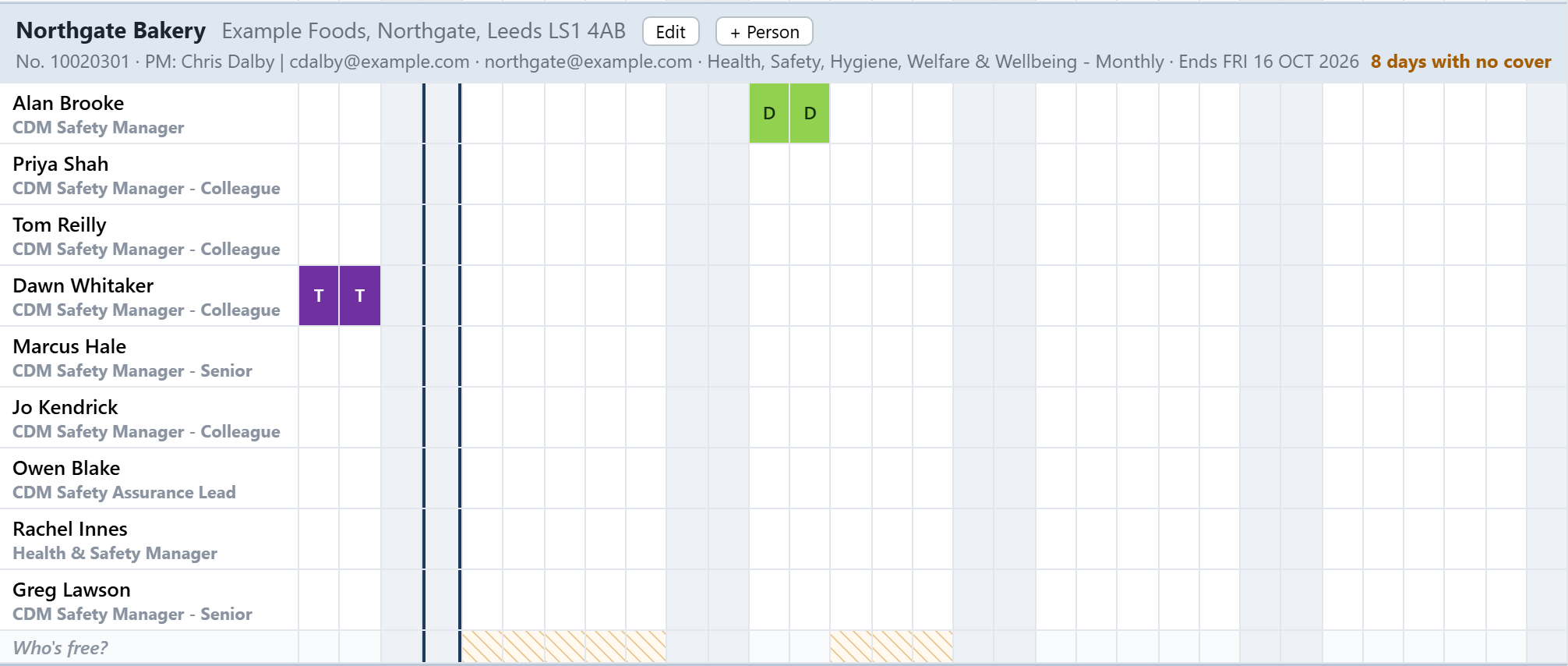
Give a project its end date and every weekday with nobody covering it is hatched and counted. Select those days and Who's free lists who could cover them, people already on that project first.
Every worker knows where to go
Each person gets their own link, free, showing only the sites they are booked on. It is live and read-only and needs no password, so there is nothing to re-send when the plan changes.
See how busy the company is
Reports turn the plan into utilisation week by week, by person, by site and by role, with booked days against the people each site needs.
What it looks like
Screens from Clarity Resource, with example people and sites. Every one is the live product, not a mock-up.
The whole plan on one screen
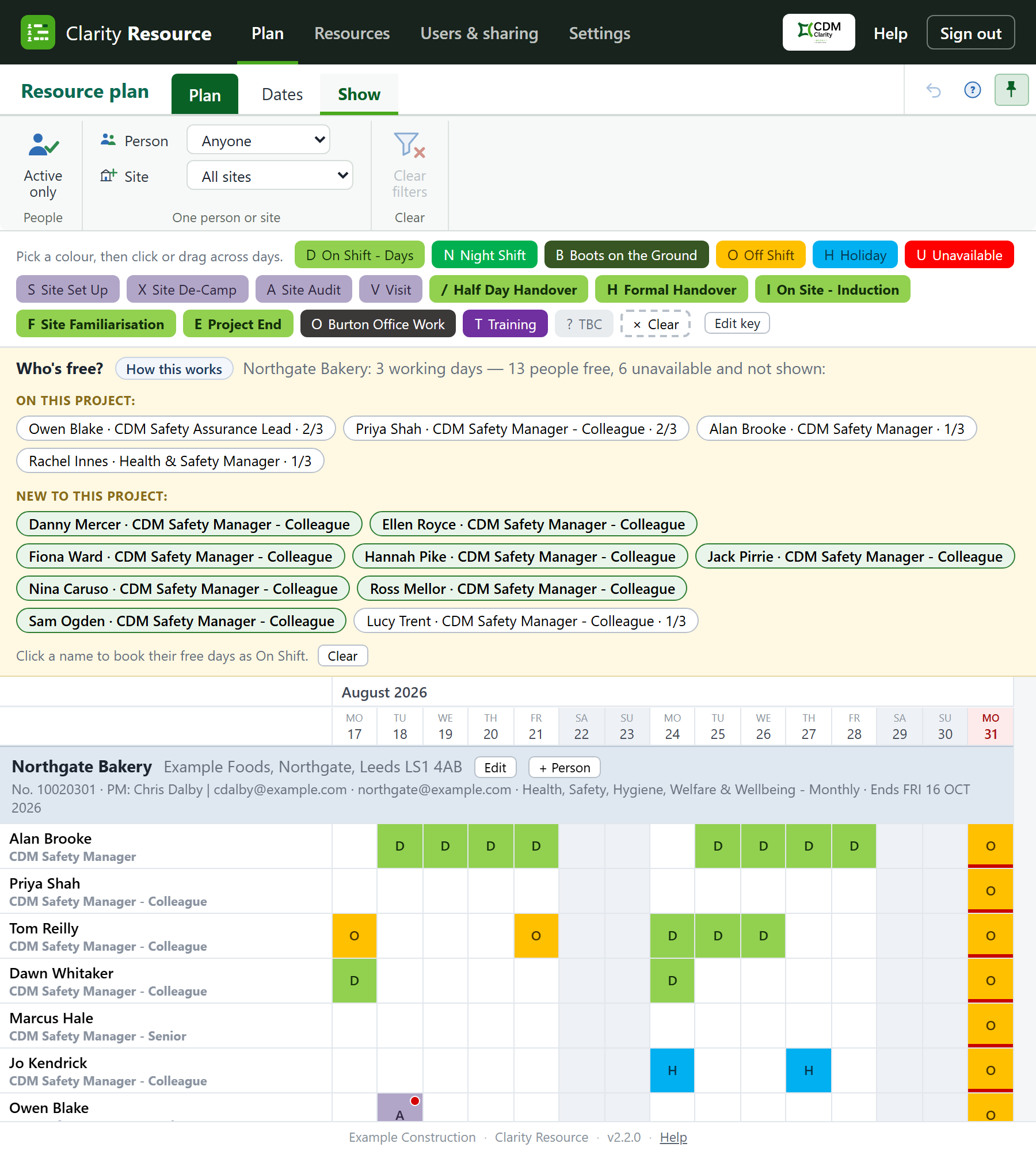
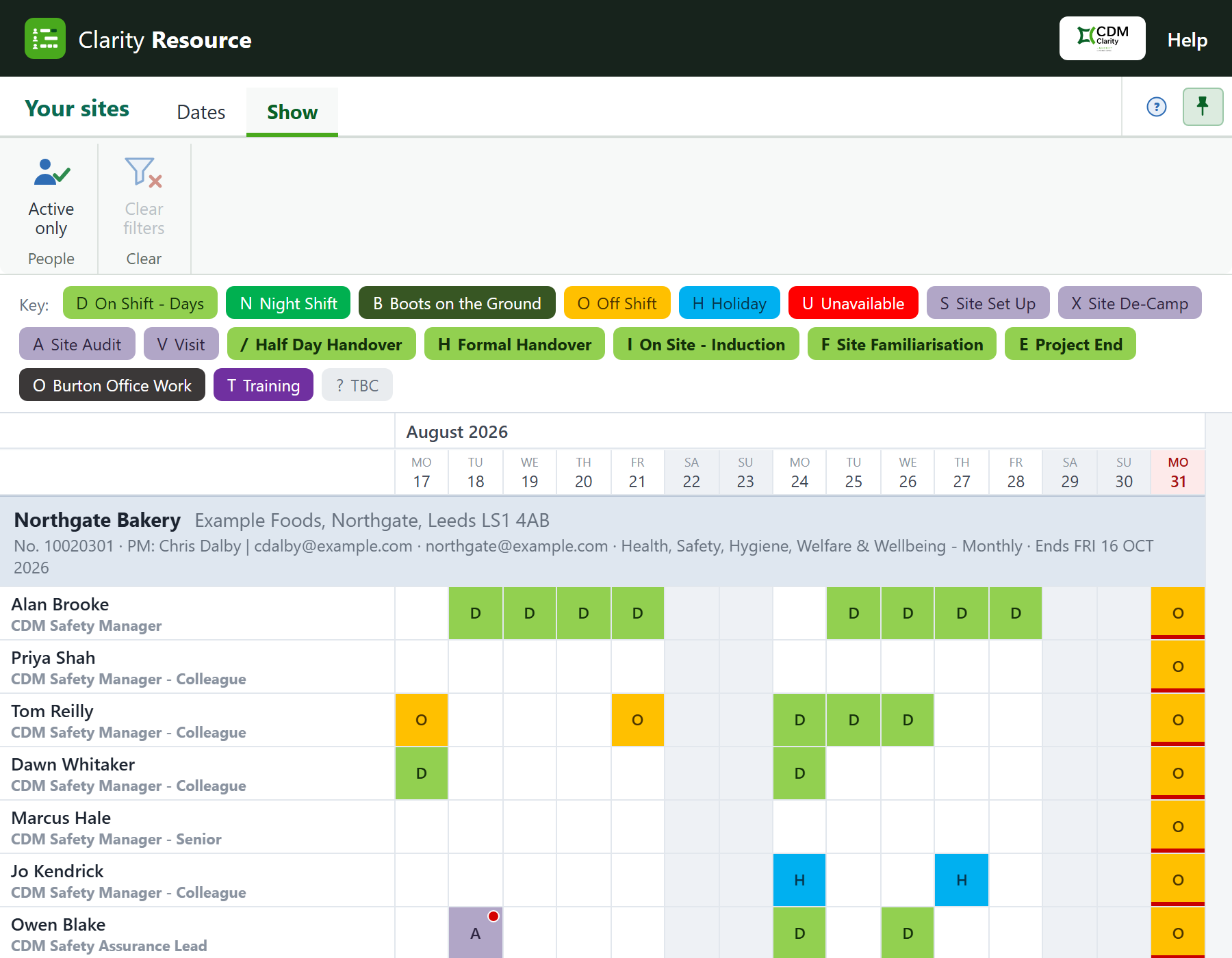
The bar, the ribbon, the colour key, the Who’s free strip, then the plan itself: every person, every site, every day.
Reading the plan
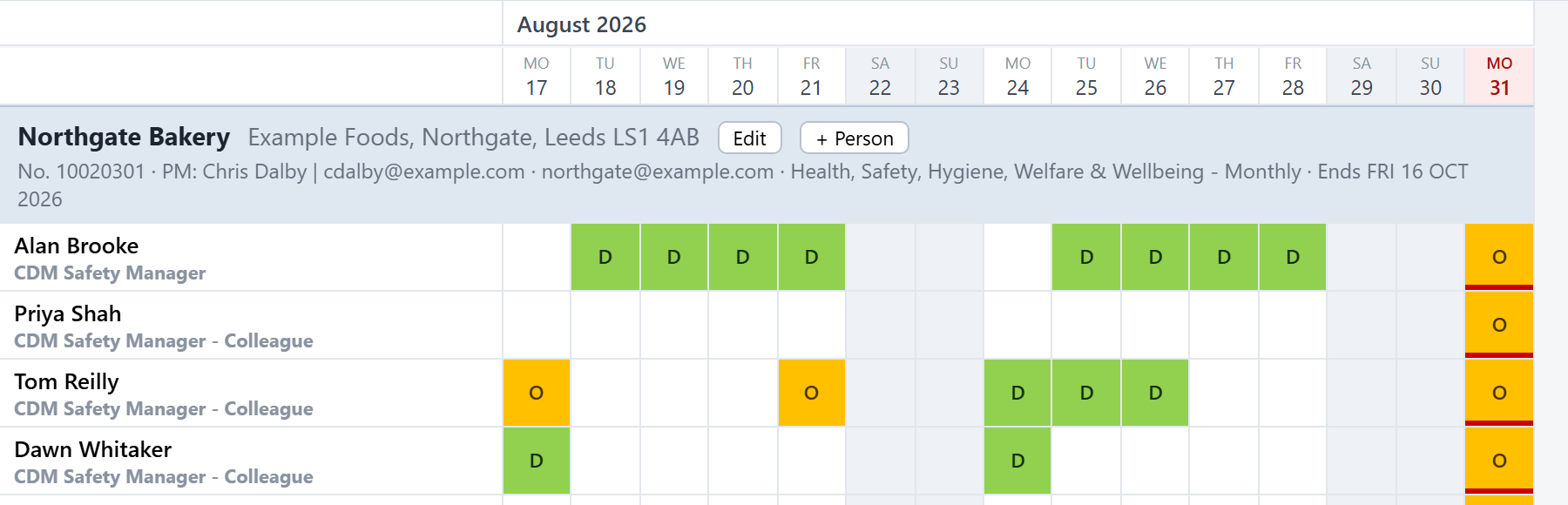
Each site is a block with its people under it. Read across for one person’s days and down for one day across the team. A letter is the kind of day (a D is a day shift, an O is off shift), and a red dot in the corner means more than a full day is booked for that person.
Who’s free
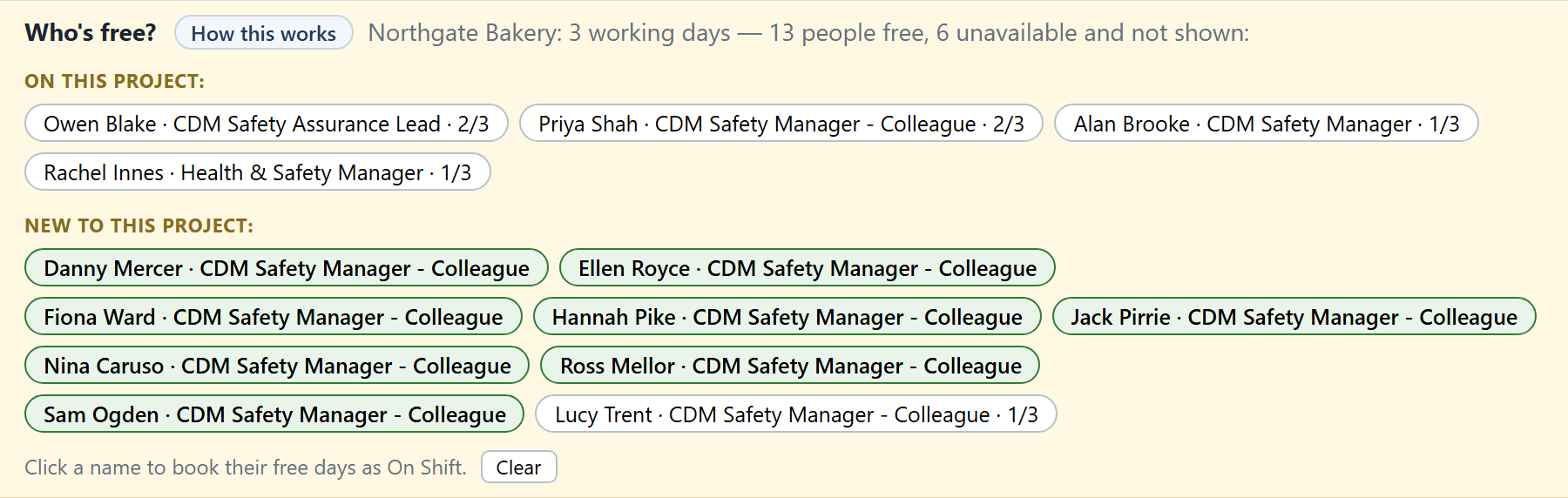
Pick some days and the strip shows who could do them: people already on this project first, then people new to it. A 2/3 means they can only do part of the selection, and anyone on holiday or unavailable is left out.
The cover check
A weekday with nobody on a site is hatched on the Who’s free strip and counted in the heading, so an empty site is flagged before it is empty.
A personal link for every worker
Each person gets their own link, free, showing only their own sites, live and read-only, on their phone.
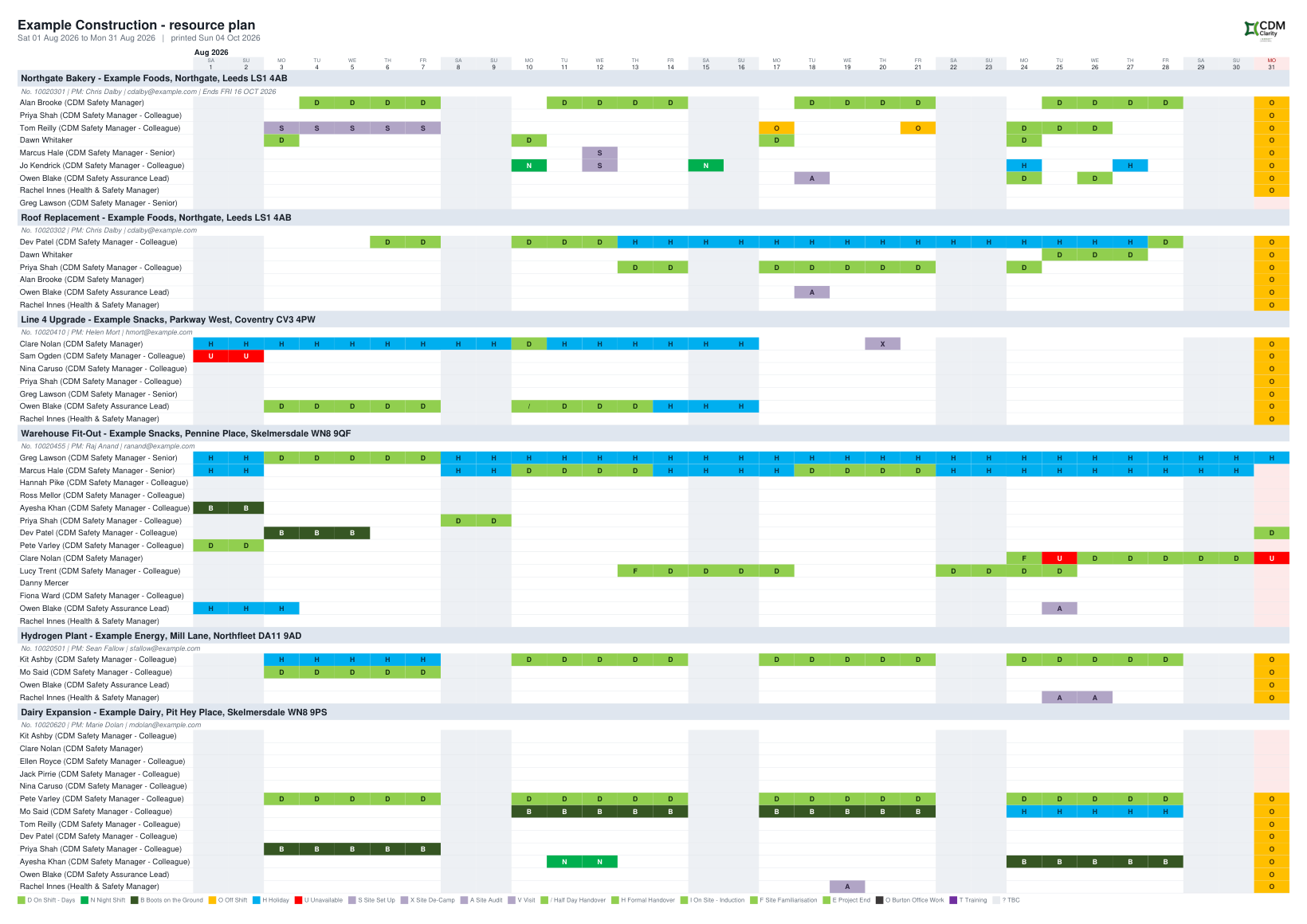
The plan on paper
A month on one A3 sheet: every project, the colours and letters, the logo and the key.
Who it is for
Contracts and operations managers
Move supervisors and operatives between sites from one plan. The red dot shows anyone booked for more than a full day.
Project managers
Set a site's end date and the people it needs a day. Uncovered weekdays are hatched, and Reports show each week booked against needed.
Planners and office coordinators
Paint the plan like a spreadsheet: pick a colour, drag across the days. Undo puts mistakes back, and one press emails everyone their own link.
Consultancies
Choose Office and projects and the key starts with project work, client meetings, bids, internal time and training, and Reports split chargeable from non-chargeable days.
Built for a plan that keeps changing
If your resource plan lives in a yearly spreadsheet, Clarity Resource keeps its shape: every project down the page, its people underneath, one column for every day. The difference is that it is live. Several people can work in it at once, there is no Save button, and December runs straight into January, so there is nothing to rebuild at the year end.
It knows what a day is. Book someone for a half day, or any share of one, and they can be on three sites at a third each. The red dot appears only when more than a full day is booked, and Who's free offers just the part of a day a person has spare.
It fits the work your company does: On site, with day and night shifts, handovers and inductions, or Office and projects, with project work, client meetings, bids and internal time. England and Wales bank holidays are worked out for every year.
Free for seven days, and no card is needed to start. After the trial it is priced for the whole company by the number of people on the plan: £34.80 a month for up to 10 people on the plan, £94.80 for up to 30, or £214.80 for up to 75 (£348, £948 or £2,148 a year). The people who do the planning are not counted. Prices include VAT. See pricing.
Pricing
The total you pay. Pay monthly, or annually for the price of ten months.
Clarity Resource
Charged per company, by the number of people on the resource plan. The people who do the planning are not counted, and every worker's phone link is free.
Prices include VAT. Clarity is sold for business use only. It is bought by companies and by people working for themselves, not by consumers.
Good to know
Never charged for
The people who build the plan, and every worker's phone link. Each person on the plan counts towards the price band.
Closed sites
A closed site stays readable and free for as long as you subscribe.
No setup fees
There are no setup fees on any product.
Free trial
Every product starts with a seven-day free trial and no card is needed to start.
If a payment lapses
If a payment lapses you keep full access for seven days; then that product becomes read-only, and you can still open, print and export everything. If it is still unpaid 60 days after it was due, the subscription ends, and you have 90 days to export before the data is deleted.
- Clarity-OO LtdRegistered in England and Wales, company number 17484245
- Registered with the ICOZC267390
- 7-day free trialNo card needed to start
- Prices include VATThe price shown is the total you pay
- Business use onlySold to companies and the self-employed, not consumers
Questions people ask about Clarity Resource
What is Clarity Resource?
A web app for planning who is on which project, and when, across the whole company. Every project sits on one plan with its people under it and a column for each day. It finds who is free to cover, flags weekdays with nobody on site, and gives every worker a free, read-only phone link.
How much does Clarity Resource cost?
After the trial it is £34.80 a month for up to 10 people on the plan, £94.80 for up to 30, or £214.80 for up to 75 (£348, £948 or £2,148 a year). Prices include VAT.
Who is charged for?
Charged per company, by the number of people on the resource plan. The people who do the planning are not counted, and every worker's phone link is free.
Does it handle day and night shifts?
Yes. The on-site key starts with day shift (D) and night shift (N), alongside handovers, inductions, site set-up and de-camp, off shift, holiday and training. Every colour and letter can be renamed, recoloured or added to.
How are bank holidays handled?
England and Wales bank holidays are worked out for every year, Easter and substitute days included. They are hatched red, skipped by Who's free and never counted as missing cover. You can add a shutdown or a one-off date.
How does the cover check work?
Give a project an anticipated end date and every weekday from today to that date is checked. A weekday with nobody on a covering shift is hatched, and the heading counts the days short. Weekends and bank holidays are never flagged.
What do workers see on their personal link?
The live plan for only the sites they have days on, with the whole team on each. It is read-only and needs no password. Switch it off when someone leaves and it stops working at once.
Can I print the plan or send it as a PDF?
Yes. Export PDF gives exactly what is on screen, on a single page: A4 landscape while it stays comfortable, A3 when it does not, with your logo, each project's details and the key. Report tables download for Excel.
How are holidays and unavailability handled?
Paint them like any other day. They never raise the double-booking dot, and anyone on holiday or unavailable on a day you select is left out of Who's free, with a count of how many, so nobody disappears without you knowing.